
Digital nomad essentials make it easier to stay productive while moving between cities, countries, and temporary living spaces. Working on the road often means adapting to unfamiliar desks, outlets, and internet setups, which can quickly wear you down if your gear is not reliable. Over time, the right equipment reduces daily friction and keeps workdays feeling steady instead of chaotic. We often talk about mobility and comfort in our digital nomad setup.
Comfort and practicality matter just as much as portability when you are living out of a backpack. Lightweight tools that solve real problems are easier to carry and easier to rely on day after day. Materials, durability, and power compatibility become more important the longer you stay on the road. These same ideas come up often when we write about our packing list for backpacking and choosing items that last.
The products below were selected because they support focused work without adding unnecessary complexity. Each item fills a clear role and works well across different environments, from coworking spaces to kitchen tables. Together, they help create a flexible setup that supports long-term travel without overpacking.

The Best Digital Nomad Essentials at a Glance
- 1Ra Optics Maxwell Frame with Sunset LensesCheck price
- 2DJI Osmo Pocket 3 Creator ComboCheck price
- 3BAGSMART Large Electronics Travel Organizer CaseCheck price
- 4ALLIVE Leather Passport Holder with AirTag PocketCheck price
- 5Loop Quiet 2 Ear PlugsCheck price
- 6INIU 20000mAh 65W Power BankCheck price
- 7Amazon Kindle Paperwhite 16GBCheck price
- 8Manduka eKO SuperLite Travel Yoga MatCheck price
- 9SafetyWing Nomad Travel InsuranceCheck price
- 10Ceptics Universal Travel AdapterCheck price
- 11Hiearcool 7-in-1 USB-C HubCheck price
- 12Macally Wired Keyboard and Mouse ComboCheck price
- 13Folishine Cat7 Ethernet CableCheck price
- 14Tonmom Adjustable Laptop StandCheck price
- 15EMEET C960 4K WebcamCheck price

Best Digital Nomad Essentials

Ra Optics Maxwell Frame with Sunset Lenses
Working across time zones often means screens stay on well after sunset. These glasses are designed to reduce blue and green light exposure in the evening, helping signal the body that the day is slowing down. For digital nomads who struggle with falling asleep in new places, this can make nights feel calmer and more predictable. The frame fits comfortably for longer wear and works well during evening reading or laptop use.
- Best Use
- Evening screen time before bed
- Notable Feature
- Advanced blue and green light filtration
- Frame Fit
- Medium to Large
- Lens Purpose
- Melatonin support
DJI Osmo Pocket 3 Creator Combo
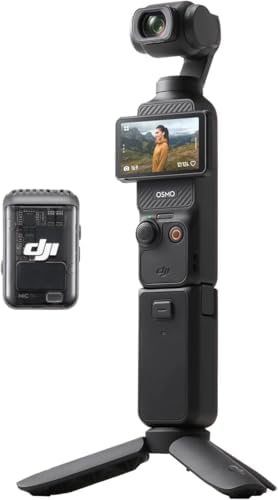
Digital nomads who document their work or travels benefit from a camera that balances quality and portability. This compact device delivers stabilized 4K video without the bulk of traditional camera setups. The rotating screen supports vertical and horizontal formats, making it adaptable for different platforms. Built-in tracking keeps framing consistent while working solo.
- Best Use
- Vlogging and content creation
- Notable Feature
- 3-axis stabilization
- Sensor
- 1-inch CMOS
- Audio
- Integrated microphone

BAGSMART Large Electronics Travel Organizer
Managing cables, adapters, and small devices can quickly become frustrating when working from cafés or coworking spaces. This organizer keeps chargers, power banks, SD cards, and accessories visible and contained. Its flat profile fits easily into backpacks without adding bulk. For nomads who rely on multiple devices, it reduces daily setup time and prevents lost cables.
- Best Use
- Cable and accessory storage
- Notable Feature
- Elastic loops and mesh pockets
- Size
- 10.6 x 7.5 x 1.2 inches
- Closure
- Dual zipper
ALLIVE Leather Passport Holder with AirTag Pocket
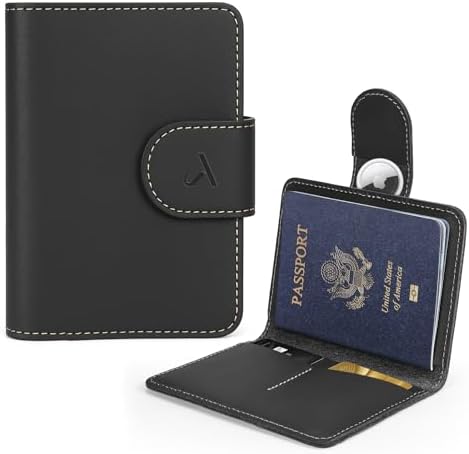
Passports and travel documents require constant access and protection on the road. This leather holder combines RFID blocking with a discreet AirTag pocket for added peace of mind. It stays slim enough for daily carry while holding essential cards and cash. The natural leather softens over time, making it comfortable to handle during frequent airport transitions.
- Material
- Full-grain leather
- Best Use
- Passport and ID storage
- Notable Feature
- Hidden AirTag pocket
- Security
- RFID blocking
- Size
- Compact travel profile

Loop Quiet 2 Ear Plugs
Noise is one of the biggest challenges for digital nomads staying in shared housing or busy cities. These reusable silicone earplugs reduce background noise without feeling rigid or intrusive. They remain comfortable for side sleepers and extended wear. For deep focus sessions or uninterrupted sleep, they offer reliable noise reduction.
- Material
- Flexible silicone
- Best Use
- Sleep and focus
- Notable Feature
- 24 dB noise reduction
- Fit
- Multiple ear tip sizes
- Reusability
- Washable design
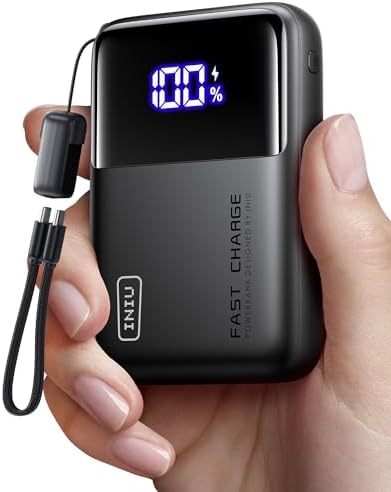
INIU 20000mAh 65W Power Bank
Reliable power access is essential for remote work days that extend beyond cafés or airports. This power bank delivers enough output to charge laptops, tablets, and phones without carrying multiple chargers. Despite its capacity, it remains compact and easy to pack. It supports consistent work sessions even during long transit days.
- Material
- Lithium battery
- Best Use
- Laptop and phone charging
- Notable Feature
- 65W fast charging
- Capacity
- 20000mAh
- Ports
- USB-C and USB-A

Amazon Kindle Paperwhite
Digital nomads often need a break from constant connectivity. This e-reader offers a focused reading experience without notifications or apps. Its glare-free screen works well in bright sunlight and dim rooms alike. Long battery life makes it easy to carry between destinations without frequent charging.
- Material
- Electronic display
- Best Use
- Reading and learning
- Notable Feature
- Adjustable warm light
- Storage
- 16GB
- Water Resistance
- Waterproof design

Manduka eKO SuperLite Travel Yoga Mat
Maintaining physical routines helps counterbalance long hours of sitting and screen time. This thin rubber yoga mat folds easily into luggage while still providing grip and stability. It suits short daily practices in hotel rooms or outdoor spaces. The natural rubber construction fits our natural-materials approach.
- Material
- Natural rubber
- Best Use
- Yoga and mobility work
- Notable Feature
- Foldable design
- Thickness
- 1.5mm
- Weight
- 2.1 pounds

SafetyWing Nomad Travel Insurance
Nomad by SafetyWing is a travel and health insurance plan designed specifically for long-term travelers, digital nomads, and backpackers. It offers coverage across 180+ countries (with US coverage as an add-on), letting you sign up either before departing or while abroad — ideal when plans change mid-trip.
What makes Nomad especially useful for travellers is its flexible duration (up to 364 days per term), plus supplementary protections like lost luggage, travel delays, and emergency evacuation. The “Complete” version expands coverage to include routine care, mental health, and burglary — meaning it can function as a more full-featured global health solution on the road.
- Country coverage Over 180 countries (US coverage optional)
- Term length Up to 364 days per period
- Medical coverage (Essential plan) up to US$250,000
- Extras Complete plan includes wellness, mental health, burglary, and trip interruption
- Age pricing tier Ages 18–39 base pricing example ~$56.28 / 4 weeks (Essential)
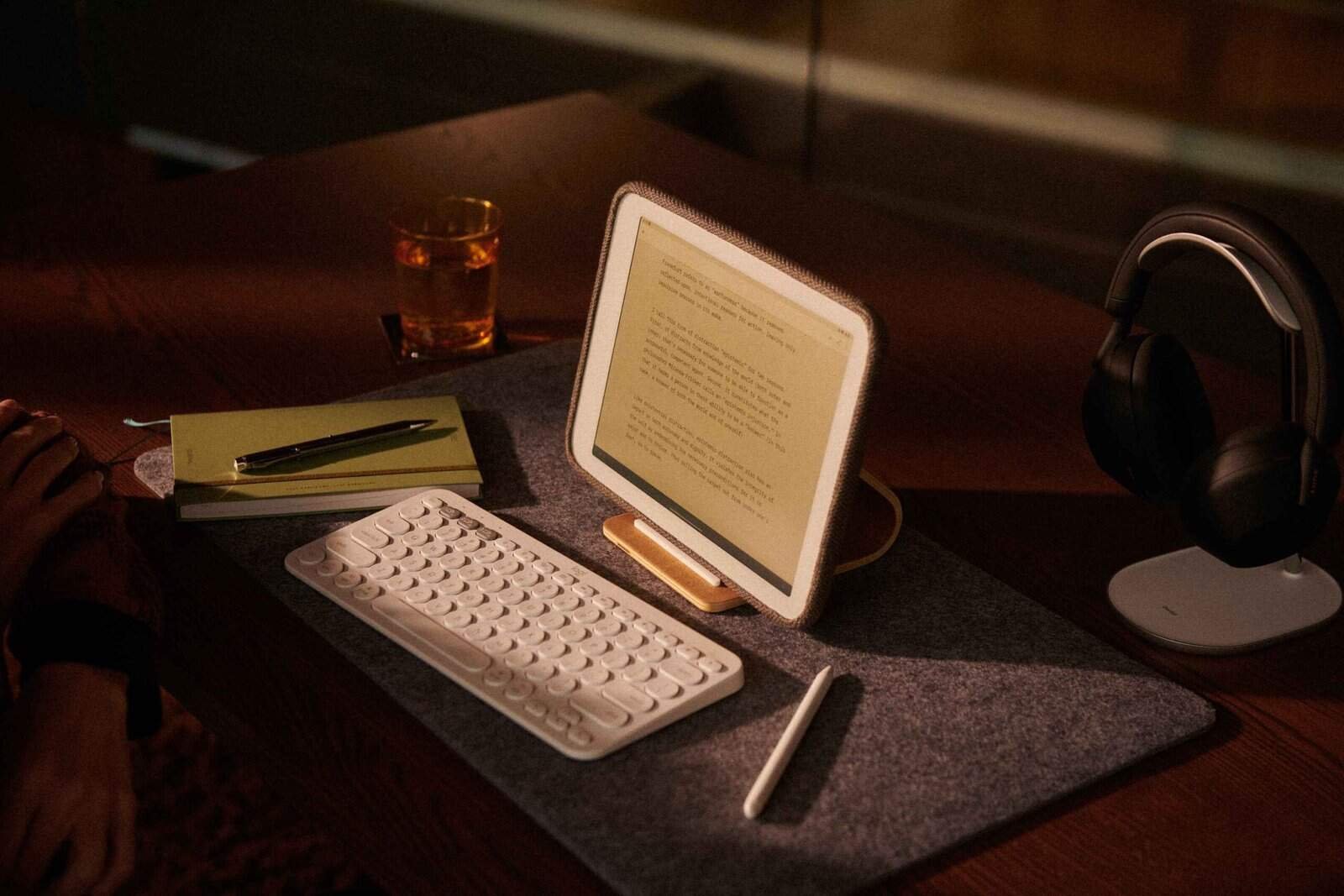
Daylight Computer
For digital nomads seeking a calmer relationship with technology, the Daylight computer offers a focused alternative. Its paper-like display reduces eye strain and encourages intentional work sessions. It supports writing, reading, and planning without the distractions of conventional laptops. This makes it a thoughtful choice for long stays and deep work.
Use the code : BAREFOOTBACKPACKERS for $25 off
- Material
- E-ink display device
- Best Use
- Writing and focused work
- Notable Feature
- Low-distraction interface
- Display
- Paper-like screen
- Power Use
- Energy efficient

Ceptics Universal Travel Adapter
The Ceptics Universal Travel Adapter handles one of the most common travel frustrations, charging devices across different countries. It supports outlets used in the US, Europe, the UK, Australia, and much of Asia, which makes it useful for long trips with multiple stops. Charging several devices at once helps reduce clutter and keeps work gear powered without hunting for extra outlets. Safety features built into the adapter add reassurance when using unfamiliar electrical systems.
- Material
- Integrated electronics with safety-certified housing
- Best Use
- International charging for laptops and mobile devices
- Notable Feature
- Multiple international plug types with USB-C power delivery

Hiearcool 7-in-1 USB-C Hub
The Hiearcool USB-C Hub expands a single laptop port into a practical workstation setup. HDMI output, USB data ports, and card readers make it easier to connect displays and accessories while traveling. Pass-through charging allows you to power your laptop while using other ports, which is useful during long work sessions. Its compact aluminum design fits easily into a travel bag.
- Material
- Aluminum housing
- Best Use
- Remote work and presentations
- Notable Feature
- 4K HDMI output with 100W USB-C power delivery

Macally Wired Keyboard and Mouse Combo
This Macally keyboard and mouse combo focuses on reliability and comfort rather than extra features. A wired connection avoids pairing issues and eliminates battery management, which can be helpful when moving frequently. The low-profile keyboard supports longer typing sessions, while the ergonomic mouse offers steady control. It works well in rentals and coworking spaces where consistency matters.
- Material
- Plastic housing with wired USB connection
- Best Use
- Temporary and long-term desk setups
- Notable Feature
- Plug-and-play compatibility across operating systems

Folishine Cat7 Ethernet Cable
Unstable Wi-Fi can disrupt workdays, especially during calls or file uploads. The Folishine Cat7 Ethernet Cable provides a reliable wired option when wireless networks fall short. Its flat design helps keep setups tidy in tight spaces like hotel rooms or apartments. Compatibility with common networking equipment makes it a useful backup to carry.
- Material
- Shielded copper wiring
- Best Use
- Stable wired internet connections
- Notable Feature
- High-speed Cat7 performance with flat cable design

Tonmom Adjustable Laptop Stand
The Tonmom Laptop Stand improves posture by raising screens closer to eye level. Adjustable height settings allow it to adapt to different desks and seating arrangements. The open structure supports airflow, helping laptops stay cooler during extended use. Its foldable design makes it easy to pack between destinations.
- Material
- ABS with silicone grip pads
- Best Use
- Ergonomic travel workstations
- Notable Feature
- Seven height adjustment levels

EMEET C960 4K Webcam
The EMEET C960 webcam supports clear video and audio for remote meetings. A true 4K sensor provides sharp visuals, while autofocus and light correction help in changing environments. Dual microphones reduce background noise, which is useful in shared spaces. A built-in privacy cover adds everyday peace of mind.
- Material
- Plastic housing with integrated lens
- Best Use
- Video calls and online meetings
- Notable Feature
- True 4K resolution with AI noise-canceling microphones
How to Choose the Right Digital Nomad Essentials
Protecting Your Eyes
Screens play a constant role in digital nomad life, but long hours of exposure can quietly wear on both focus and comfort. Extended computer use places strain on the eyes and nervous system, especially when lighting and posture are overlooked. According to guidance on computer-related eye strain, small adjustments can significantly reduce fatigue. With mindful habits, screen work can feel more balanced and sustainable.
One effective habit is regularly shifting your gaze away from the screen and toward something farther away. Looking into the distance allows the eye muscles to relax after sustained close focus. Blinking also tends to slow down when working on a laptop, so making a conscious effort to blink and pause can ease dryness and tension. These short breaks support comfort without breaking concentration.
Natural light remains one of the most supportive tools for eye health and overall rhythm. Working near a window or stepping outside during the day helps regulate energy and visual comfort. Sunlight reinforces circadian cues that screens often disrupt, which we explore further in our guide to daily sunlight exposure while traveling. Even brief exposure can restore clarity and reduce the heaviness that builds during indoor work.
Display choice also makes a meaningful difference. E-ink devices like the Daylight computer reflect ambient light instead of emitting blue light, making them easier on the eyes in bright environments. They work particularly well outdoors or in sunlit rooms where traditional screens struggle. For reading, writing, and planning, this type of display supports longer sessions with less strain.
When extended screen time is unavoidable, eye protection becomes essential. Clear blue-light-filtering glasses can help during daytime work by softening harsher frequencies while preserving natural color balance. As evening approaches, switching to red-tinted lenses blocks artificial light more fully. These small shifts help protect circadian rhythm, support deeper rest, and allow digital nomads to stay focused during the day without sacrificing sleep at night.
Prioritizing Sleep and Recovery
Sleep quality directly affects productivity and mental health while working remotely. Digital nomads often face inconsistent schedules and unfamiliar environments. Gear that supports rest helps create a stable foundation regardless of location. Small tools can make a meaningful difference when used consistently.
Noise reduction and blue light management are two of the biggest factors to consider. Items like earplugs and evening lenses help signal the body that it is time to rest. Over time, these habits support more regular sleep patterns. Consistency matters more than complexity.
Supporting Focus and Work Flow
Remote work demands sustained concentration, often in imperfect environments. Choosing tools that reduce distractions helps maintain steady output.
Power reliability and ergonomic setup also influence focus. Portable chargers and compact organizers reduce interruptions during the workday. When tools are easy to access, mental energy stays on the task. This supports a calmer work rhythm.
Staying Organized While Moving Often
Frequent packing and unpacking can become draining without a system. Organization tools help keep essentials visible and accessible. This reduces stress during transitions and saves time daily. Small efficiencies add up over months of travel.
Look for items that serve one clear purpose and fit your routine. Overpacking often leads to clutter rather than convenience. Thoughtful organization supports mobility without excess. This balance is key for long-term nomadic life.
FAQs
Do digital nomads need a wired keyboard and mouse?
They are not required, but they can improve comfort during long work sessions. Wired options also avoid battery and connection issues.
Is a travel adapter enough for all electronics?
Adapters work if devices support 100 to 240 volts. They do not convert voltage, so checking device compatibility is important.
Are laptop stands worth packing?
Many travelers find them helpful for posture and comfort. Foldable designs keep weight and space minimal.